Sending Images and Files
Attach images and files to your messages to provide context to the AI agent.
Attaching Files
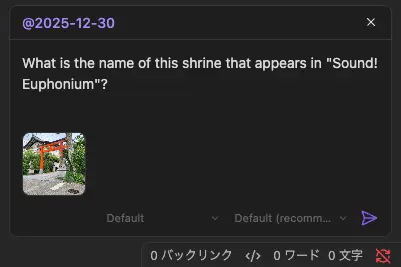
Drag and Drop
- Drag files from Finder/Explorer onto the input area
- The input area highlights when you drag over it
- Thumbnails (images) or file icons (other files) appear below the text area
Paste from Clipboard
- Copy a file or image to your clipboard
- Focus the input field
- Paste with
Cmd/Ctrl + V
TIP
Embedding images in messages requires agent support. If the agent doesn't support images, image files are sent as file references instead (via drag and drop or paste from Finder/Explorer).
Managing Attachments
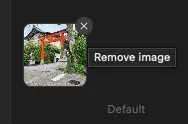
Attached files appear as thumbnails or file icons below the text area.
- Remove an attachment: Hover over it and click the × button
- Attachments are sent with your message: When you send, all attached files are included
Supported Image Formats
| Format | MIME Type |
|---|---|
| PNG | image/png |
| JPEG | image/jpeg |
| GIF | image/gif |
| WebP | image/webp |
Non-image files have no format restriction.
INFO
Non-image files are sent as file path references. How the agent processes the file depends on its capabilities and available tools.
Limits
| Limit | Value |
|---|---|
| Maximum image size | 5 MB per image |
| Maximum attachments | 10 per message (images + files combined) |
INFO
If you exceed these limits, a notification will inform you:
[Agent Client] Image too large (max 5MB)[Agent Client] Maximum 10 attachments allowed